
Video MP3 Converter
Screenshots
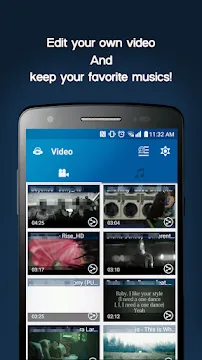
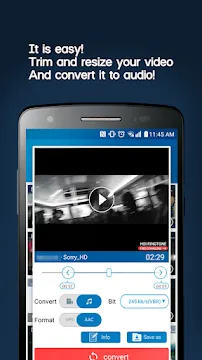
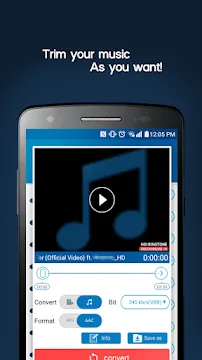
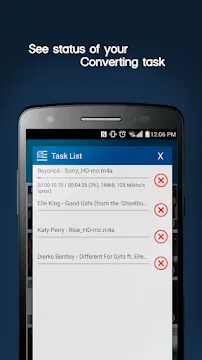
Video MP3 Converter provides a seamless solution for users who need to extract high-quality audio tracks from video files. Many people collect video clips on their mobile devices every day. However, listening to full videos consumes excessive battery power and screen time. Therefore, converting video files into audio format saves valuable storage space and battery life.
Furthermore, this mobile application process works quickly without requiring complex technical skills. Users simply choose a saved video, select an audio format, and tap the convert button. Consequently, anyone can transform long media files into compact sound tracks within seconds. In addition, the light file size ensures smooth performance on all compatible mobile devices.
Core Functions of Video MP3 Converter
Extracting audio from video files requires precise processing power to preserve clear sound quality. Firstly, the conversion tool scans the source video file to isolate the original sound layer. Then, it converts the stream into popular formats like MP3 or AAC without quality loss. As a result, users receive clean audio files ready for immediate playback in any media player.
Moreover, the application manages multiple input file formats effortlessly. For example, it processes video files like MP4, 3GP, WEBM, and WMV without errors. After that, users can choose specific bitrates to balance file size and sound clarity. Therefore, you gain total control over your offline music library on your phone.
Key Features of Video MP3 Converter App For Android
This media application offers essential functions that simplify audio extraction and basic file editing. Below are the key tools built directly into the mobile application.
Fast Media Conversion Engine
Speed remains a critical factor when processing heavy media files on mobile devices. Luckily, the built-in encoding engine transforms video files into sound tracks rapidly. In fact, standard music tracks convert in just a few seconds.
Furthermore, background conversion allows users to run tasks while navigating other apps. Consequently, you can process large media queues without waiting on a static progress screen. This design saves time and keeps your mobile workflow uninterrupted throughout the day.
In addition, hardware acceleration optimizes CPU usage during heavy file operations. That is to say, your device processes media without heating up or slowing down. As a result, you enjoy smooth performance during extended video editing sessions.
Integrated Metadata Tag Editor
Organizing a large music collection requires accurate file details and cover art. Luckily, the built-in tag editor lets users edit metadata directly after conversion. For instance, you can update song titles, artist names, and album information easily.
In addition, users can attach custom album artwork to their converted audio tracks. As a result, music players display correct cover art during offline music playback. This feature keeps your personal audio library neat, modern, and perfectly organized.
Meanwhile, proper metadata tags help audio players categorize songs into distinct genres and playlists. Therefore, you never have to deal with untagged or messy music tracks again. This tool streamlines full album management directly from your mobile screen.
Built-in Audio and Video Trimmer
Trimming media clips helps isolate specific segments from long video recordings. Firstly, the precise slider tool lets users set exact start and end timestamps. Then, the application cuts the unwanted sections with impressive frame accuracy.
Furthermore, users can trim videos before initiating the main conversion process. That is to say, you only extract audio from the relevant video segment. Consequently, you save device storage space by avoiding unnecessary audio file length.
Likewise, the audio trimmer works on existing sound files stored in your internal storage. You can remove silence, noisy intros, or unwanted outro commentary in seconds. In short, this eliminates the need for downloading secondary video trimming tools.
Bitrate Control and Custom Quality
Audio quality depends heavily on selected bitrate settings during the conversion setup. To clarify, higher bitrates offer richer sound but require more device storage space. The application provides multiple options ranging from 64 kbps up to 320 kbps.
For example, casual voice recordings work well at lower bitrates to conserve space. On the other hand, music tracks benefit from higher bitrates like 256 kbps or 320 kbps. Therefore, users can customize audio fidelity according to their personal storage needs.
Additionally, variable bitrate options optimize sound quality while maintaining smaller file dimensions. Consequently, you achieve the ideal balance between rich acoustic clarity and storage efficiency. This flexibility gives users complete control over their mobile media library parameters.
Multi-Format Output Support
Format compatibility issues often arise when transferring media files across different playback devices. Luckily, this application supports a broad array of audio output formats. For instance, users can choose standard MP3 or high-efficiency AAC formats.
Likewise, the app handles various input video formats like FLV, AVI, and MKV seamlessly. In other words, you do not need separate conversion utilities to process rare formats. Everything happens smoothly within a single, highly clean user interface.
Furthermore, converting videos to OGG or WAV format provides extra compatibility for specialized tasks. As a result, your exported audio files play on car stereos, home speakers, and phones. This multi-format versatility handles diverse media conversion demands with ease.
Custom Ringtone and Alarm Creation
Creating personalized alert tones from favorite video clips adds a unique personal touch. Above all, the app includes a dedicated ringtone maker tool. Users can trim any converted track and export it directly as an alert sound.
After that, you can assign the clip as a default phone ringtone or alarm sound. In short, this feature eliminates the need for extra ringtone creation applications. You turn memorable video sound tracks into active phone alerts instantly.
Moreover, you can assign specific custom ringtones to individual contacts in your address book. Consequently, you know who is calling based on your customized audio clips. This practical tool turns video audio extraction into everyday custom phone sounds.
Audio Formatting and Quality Customization in Video MP3 Converter
Choosing the proper audio format plays a vital role in media file management. For instance, the MP3 format ensures universal playback across almost every audio player. On the other hand, AAC offers superior compression efficiency at lower file sizes. Therefore, understanding these format differences helps users optimize device storage effectively.
In addition, bitrate customization gives users flexible control over audio file dimensions. Lower bitrate settings work best for podcasts, audiobooks, and basic speech recordings. Conversely, music enthusiasts prefer maximum bitrate settings to capture rich dynamic range. Consequently, custom quality settings accommodate every user audio preference perfectly.
Video MP3 Converter: Performance Efficiency in Daily Conversion Tasks
Mobile hardware requires efficient app architecture to process heavy media operations smoothly. Fortunately, this conversion tool utilizes optimized system libraries to accelerate file processing. As a result, media conversions complete rapidly without causing excessive battery drain. Meanwhile, system temperature remains stable during heavy batch conversion operations.
Furthermore, the user interface focuses on clean design principles and immediate accessibility. Users can navigate local storage directories effortlessly to locate source video files. Subsequently, clear action buttons guide users through format choices and trimming adjustments. In short, the streamlined layout eliminates confusion for technical and casual users alike.
How to Download and Install Video MP3 Converter APK
Installing the application file manually allows users to access updated media editing features quickly. Follow the simple steps outlined below to complete the installation process seamlessly.
- First, locate the secure download source on your mobile web browser.
- Next, Click the download button to save the APK file on your device.
- Then, open your device file manager and locate the downloaded file in your downloads folder.
- After that, enable installation permission from unknown sources in your device security settings.
- Finally, tap the file to launch the installer and complete the setup in seconds.
Video MP3 Converter Tips and Tricks
Maximizing the utility of your audio extraction tool requires a few smart operational habits. Consider these practical guidelines during your daily conversion tasks:
- Trim unnecessary video segments before starting conversion to cut down file export times significantly.
- Select a 128 kbps bitrate for spoken voice recordings to save valuable internal storage space.
- Use 320 kbps MP3 settings when converting concert recordings or music clips to keep maximum sound clarity.
- Update metadata tags immediately after conversion so your offline music player categorizes albums accurately.
- Apply the built-in cutter to extract key audio choruses for custom phone ringtones and alarm notifications.
- Clear finished video cache files regularly to keep your internal device memory clean and organized.
Final Verdict
Extracting audio from offline video clips remains an essential daily task for many mobile users. This conversion application combines fast extraction speed, multi-format support, and precise tag editing into one clean interface. Consequently, users can transform heavy video files into lightweight audio tracks without losing sound quality.
In conclusion, the app offers all necessary editing tools for creating ringtones and managing custom audio files. Simple controls and fast performance make media management accessible for everyone. Therefore, acquiring this application file remains a smart choice for anyone seeking reliable mobile audio conversion.
- XRecorder Screen Recorder
- AZ Screen Recorder
-
PowerDirector
 Download
PowerDirector - Video Editor
PowerDirector offers an incredible video editing experience...
- VITA – Video Editor & Maker
- Amazon Photos
- CapCut
- TIDAL Music
- Blurrr